

Analysis
우선 로그인을 한번 한 뒤에 아래와 같이 autofill 이라는 기능이 있어서 어떤 저장 기능이 있을 것이라고 생각이 들었다.

그래서 adb shell을 통해, 내부 저장소를 확인해본 결과 아래와 같이 인코딩과 암호화가 되어있는 username, password가 저장되어 있는 것을 확인하였다. → Local Encryption issues (로컬 암호화 문제)

로그인을 마지막으로 한 정보가 autofill 기능으로 채워지기 때문에 로그인과 관련된 액티비티가 있는지 확인해보았고, DoLogin.java 파일이 있어서 해당 코드를 확인해보았다.
아래와 같이 예상했던 로직을 나타내는 코드가 있었다.
private void saveCreds(String username, String password) throws UnsupportedEncodingException, InvalidKeyException, NoSuchAlgorithmException, NoSuchPaddingException, InvalidAlgorithmParameterException, IllegalBlockSizeException, BadPaddingException {
    SharedPreferences mySharedPreferences = DoLogin.this.getSharedPreferences("mySharedPreferences", 0);
    SharedPreferences.Editor editor = mySharedPreferences.edit();
    DoLogin.this.rememberme_username = username;
    DoLogin.this.rememberme_password = password;
    String base64Username = new String(Base64.encodeToString(DoLogin.this.rememberme_username.getBytes(), 4));
    CryptoClass crypt = new CryptoClass();
    DoLogin.this.superSecurePassword = crypt.aesEncryptedString(DoLogin.this.rememberme_password);
    editor.putString("EncryptedUsername", base64Username);
    editor.putString("superSecurePassword", DoLogin.this.superSecurePassword);
    editor.commit();
}
코드를 보았을 때, username은 단순히 base64 인코딩으로 암호화를 적용하였고, password는 CryptoClass 를 통해서 암호화가 적용됨을 알 수 있다. → Weak Cryptography implementation (약한 암호화 구현)
CryptoClass.java라는 파일을 이어서 확인해 보았을 때, 아래와 같이 암호화 로직을 확인할 수 있다. 또한 해당 정보들은 mySharedPreferences라는 이름의 파일에 저장되는 것 또한 확인된다.
public class CryptoClass {
    String base64Text;
    byte[] cipherData;
    String cipherText;
    String plainText;
    String key = "This is the super secret key 123";
    byte[] ivBytes = {0, 0, 0, 0, 0, 0, 0, 0, 0, 0, 0, 0, 0, 0, 0, 0};

    public static byte[] aes256encrypt(byte[] ivBytes, byte[] keyBytes, byte[] textBytes) throws UnsupportedEncodingException, NoSuchAlgorithmException, NoSuchPaddingException, InvalidKeyException, InvalidAlgorithmParameterException, IllegalBlockSizeException, BadPaddingException {
        AlgorithmParameterSpec ivSpec = new IvParameterSpec(ivBytes);
        SecretKeySpec newKey = new SecretKeySpec(keyBytes, "AES");
        Cipher cipher = Cipher.getInstance("AES/CBC/PKCS5Padding");
        cipher.init(1, newKey, ivSpec);
        return cipher.doFinal(textBytes);
    }

// Decrypt 코드도 중간에 포함되어 있다..

    public String aesEncryptedString(String theString) throws UnsupportedEncodingException, InvalidKeyException, NoSuchAlgorithmException, NoSuchPaddingException, InvalidAlgorithmParameterException, IllegalBlockSizeException, BadPaddingException {
        byte[] keyBytes = this.key.getBytes("UTF-8");
        this.plainText = theString;
        this.cipherData = aes256encrypt(this.ivBytes, keyBytes, this.plainText.getBytes("UTF-8"));
        this.cipherText = Base64.encodeToString(this.cipherData, 0);
        return this.cipherText;
    }
}
코드에서 볼 수 있듯이, AES가 사용되고, key bit 크기도 256bit임을 알 수 있다. 또한, key 값이
"This is the super secret key 123”로 하드코딩 되어 있는 것을 확인할 수 있는데, 이를 이용해서 내부저장소에 암호화가 된 상태로 저장되어 있던 password를 복호화 할 수 있다. → Hardcoded secrets (하드코딩된 비밀)
또한, DoLogin.java 파일에서도 하드코딩된 secret 값이 있는데, 아래와 같이 개발자가 편하게 사용하기 위해서 실제 코드 단에 작성되어 있는것을 확인할 수 있고, 실제로도 username이 “devadmin” 값일 때, 바로 다른 password 없이 로그인이 되는 것을 확인할 수 있다. → Hardcoded secrets (하드코딩된 비밀)
  public void postData(String valueIWantToSend) throws ClientProtocolException, IOException, JSONException, InvalidKeyException, NoSuchAlgorithmException, NoSuchPaddingException, InvalidAlgorithmParameterException, IllegalBlockSizeException, BadPaddingException {
      HttpResponse responseBody;
      HttpClient httpclient = new DefaultHttpClient();
      HttpPost httppost = new HttpPost(DoLogin.this.protocol + DoLogin.this.serverip + ":" + DoLogin.this.serverport + "/login");
      HttpPost httppost2 = new HttpPost(DoLogin.this.protocol + DoLogin.this.serverip + ":" + DoLogin.this.serverport + "/devlogin");
      List<NameValuePair> nameValuePairs = new ArrayList<>(2);
      nameValuePairs.add(new BasicNameValuePair("username", DoLogin.this.username));
      nameValuePairs.add(new BasicNameValuePair("password", DoLogin.this.password));
      if (DoLogin.this.username.equals("devadmin")) {
          httppost2.setEntity(new UrlEncodedFormEntity(nameValuePairs));
          responseBody = httpclient.execute(httppost2);
      } else {
          httppost.setEntity(new UrlEncodedFormEntity(nameValuePairs));
          responseBody = httpclient.execute(httppost);
      }
      InputStream in = responseBody.getEntity().getContent();
      DoLogin.this.result = convertStreamToString(in);
      DoLogin.this.result = DoLogin.this.result.replace("\n", "");
      if (DoLogin.this.result != null) {
          if (DoLogin.this.result.indexOf("Correct Credentials") != -1) {
              Log.d("Successful Login:", ", account=" + DoLogin.this.username + ":" + DoLogin.this.password);
              saveCreds(DoLogin.this.username, DoLogin.this.password);
              trackUserLogins();
              Intent pL = new Intent(DoLogin.this.getApplicationContext(), (Class<?>) PostLogin.class);
              pL.putExtra("uname", DoLogin.this.username);
              DoLogin.this.startActivity(pL);
              return;
          }
          Intent xi = new Intent(DoLogin.this.getApplicationContext(), (Class<?>) WrongLogin.class);
          DoLogin.this.startActivity(xi);
      }
}
오픈소스로 공개된 도구들을 사용해서 username과 password를 복호화한 내용은 아래와 같다.
1. username 복호화
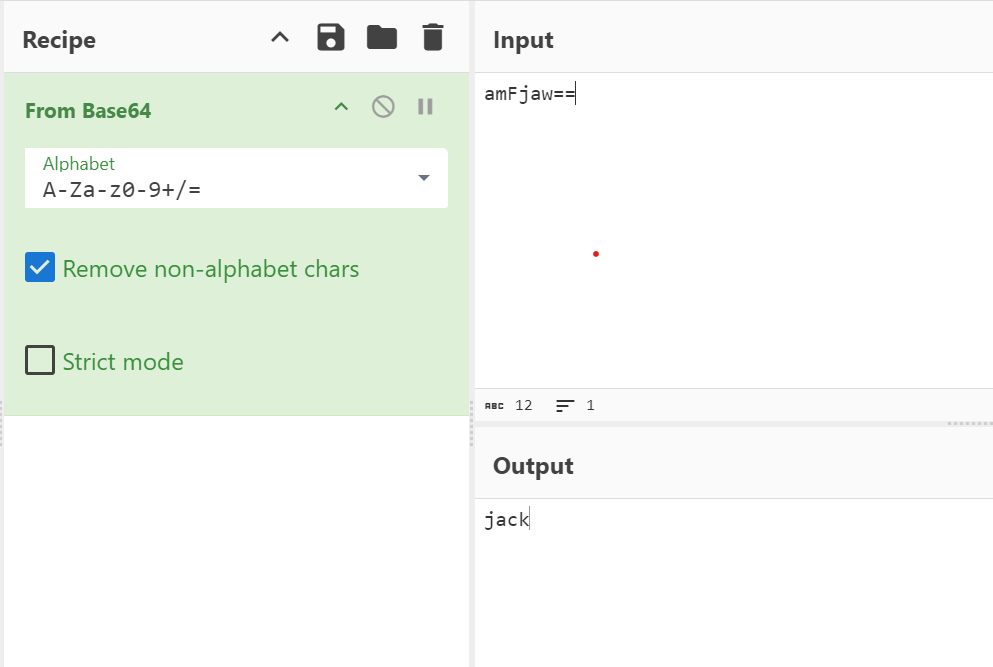
2. password 복호화

Mitigation
- 우선 내부저장소에 username, password가 저장되어 있는데, username을 단순 base64 인코딩 방식이 아닌 password와 같이 AES 암호화 알고리즘이 적용되어야 할 필요가 있다.
- AES 암호화/복호화에 사용되는 Key 값은 따로 빼서 관리를 해야한다. (코드내에 하드코딩 되어 있으면 안됨.)
'Hacker > APP' 카테고리의 다른 글
| Insecurebankv2 - Insecure Content Provider access (취약한 컨텐트 프로바이더 접근) (0) | 2024.08.21 |
|---|---|
| drozer 환경 구축 (0) | 2024.08.20 |
| Diva 풀이 4~6번 (Insecure Data Storage - Part 2 ~ 4) (0) | 2024.08.09 |
| InsecureBankv2 환경 구축 (0) | 2024.08.09 |
| Diva 풀이 1~3번 (Insecure logging ~ Insecure Data Storage - Part 1) (0) | 2024.08.08 |