

9번 Access Control Issues Part 1
Source Code
- AndroidManifest.xml
        <activity
            android:label="@string/d9"
            android:name="jakhar.aseem.diva.AccessControl1Activity"/>
        <activity
            android:label="@string/apic_label"
            android:name="jakhar.aseem.diva.APICredsActivity">
            <intent-filter>
                <action android:name="jakhar.aseem.diva.action.VIEW_CREDS"/>
                <category android:name="android.intent.category.DEFAULT"/>
            </intent-filter>
</activity>- AccessControlActivity
package jakhar.aseem.diva;

import android.content.Intent;
import android.os.Bundle;
import android.support.v7.app.AppCompatActivity;
import android.util.Log;
import android.view.View;
import android.widget.Toast;

/* loaded from: classes.dex */
public class AccessControl1Activity extends AppCompatActivity {
    /* JADX INFO: Access modifiers changed from: protected */
    @Override // android.support.v7.app.AppCompatActivity, android.support.v4.app.FragmentActivity, android.support.v4.app.BaseFragmentActivityDonut, android.app.Activity
    public void onCreate(Bundle savedInstanceState) {
        super.onCreate(savedInstanceState);
        setContentView(R.layout.activity_access_control1);
    }

    public void viewAPICredentials(View view) {
        Intent i = new Intent();
        i.setAction("jakhar.aseem.diva.action.VIEW_CREDS");
        if (i.resolveActivity(getPackageManager()) != null) {
            startActivity(i);
        } else {
            Toast.makeText(this, "Error while getting API details", 0).show();
            Log.e("Diva-aci1", "Couldn't resolve the Intent VIEW_CREDS to our activity");
        }
    }
}- APICredsActivity
package jakhar.aseem.diva;

import android.os.Bundle;
import android.support.v7.app.AppCompatActivity;
import android.widget.TextView;

/* loaded from: classes.dex */
public class APICredsActivity extends AppCompatActivity {
    /* JADX INFO: Access modifiers changed from: protected */
    @Override // android.support.v7.app.AppCompatActivity, android.support.v4.app.FragmentActivity, android.support.v4.app.BaseFragmentActivityDonut, android.app.Activity
    public void onCreate(Bundle savedInstanceState) {
        super.onCreate(savedInstanceState);
        setContentView(R.layout.activity_apicreds);
        TextView apicview = (TextView) findViewById(R.id.apicTextView);
        apicview.setText("API Key: 123secretapikey123\nAPI User name: diva\nAPI Password: p@ssword");
    }
}
Solution
우선 해당 문제는 Intent-filter로 acitivity를 보호해서 생기는 문제를 담고 있는데,
먼저 Intent에 대해서 간단하게 알아보자면,
Activity들은 단위로 나뉘어져서 서로 다른 스레드와 서로 다른 메모리 공간, 서로 다른 생명주기를 갖고 동작한다. Intent는 이런 Activity와 Activity를 이어주는 역할을 한다.
또 한 Activity에서 다른 Activity를 실행시켜주는 역할을 하는데, 이미 돌아가는 안드로이드 os에서 안전하게 다른 액티비티 스레드를 동작시켜주기 위해서 Activity 내에서 명시적으로 다른 Activity class를 생성해 만드는 것보다, 안전하게 액티비티를 생성하고, 기존 액티비티를 중지하거나 제거해주는 것이 필요하다.
Intent가 이런 역할을 하고, Activity에서 Intent에게 request를 하고 인텐트가 이를 처리해서 실행하는 기능을 하는 것이다. 즉 os에게 이런 Activity를 실행해달라는 기능을 적어둔 명세서가 Intent인 것
안드로이드 manifest.xml에서 디폴트로 exported=false로 설정되어 있지만, 해당 컴포넌트에 Intent-filter를 설정할 경우 exported 설정값이 true로 변경된다. 즉 Intent-filter가 설정된 actaivity에 exported=false 설정이 없을 경우 am 명령어를 통해서 실행시킬 수 있다.
다음과 같이 일반적인 경로에서 intent로 setAction을 동작해 다른 액티비티를 호출하는데, 결과적으로 오른쪽과 같이 Credential 정보를 볼 수 있다.
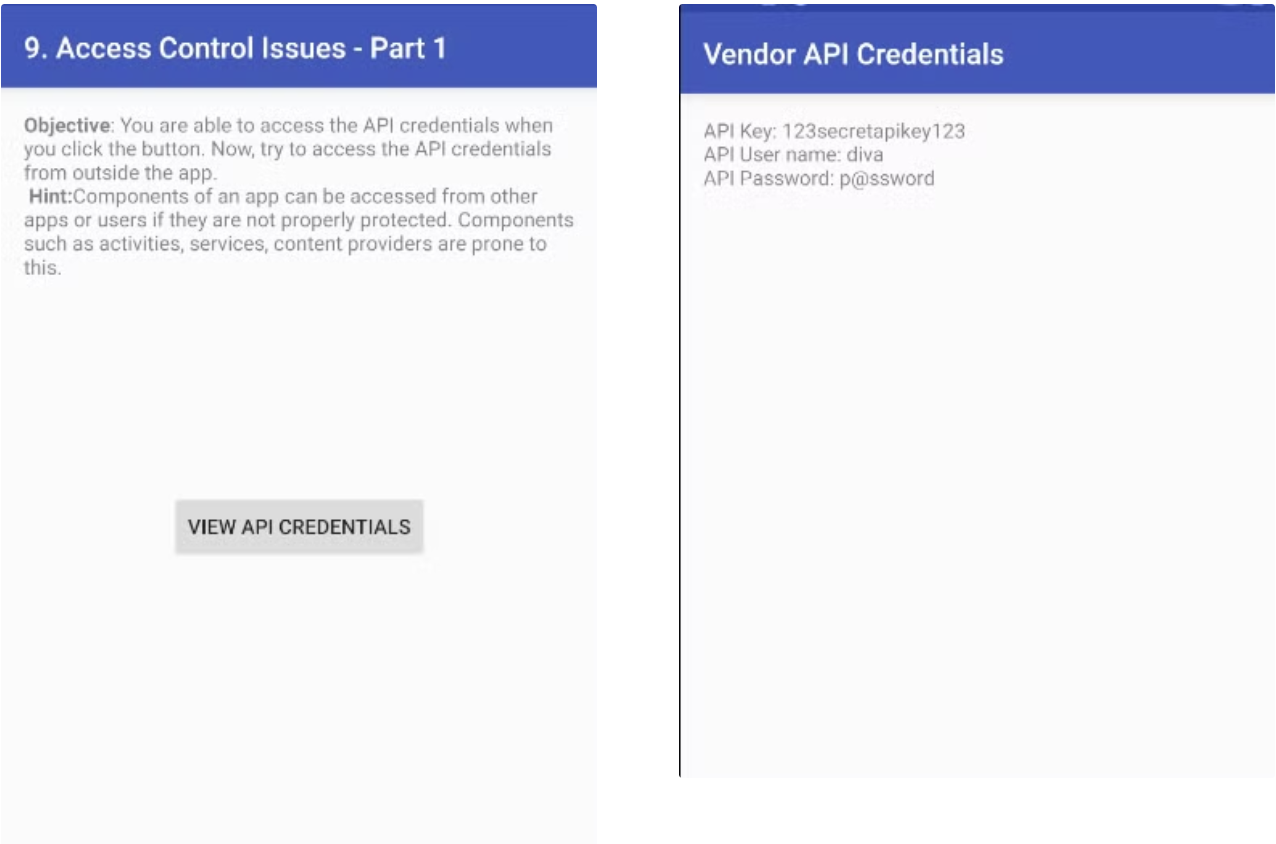
하지만, 해당 취약점이 있는것을 확인하고 나서, am 명령어를 통해 해당 Activity를 바로 호출할 수 있다.

10번 Access Control Issues - Part 2
Source code
- AndroidManifest.xml
<activity
    android:label="@string/d10"
    android:name="jakhar.aseem.diva.AccessControl2Activity"/>
<activity
    android:label="@string/apic2_label"
    android:name="jakhar.aseem.diva.APICreds2Activity">
    <intent-filter>
        <action android:name="jakhar.aseem.diva.action.VIEW_CREDS2"/>
        <category android:name="android.intent.category.DEFAULT"/>
    </intent-filter>
</activity>- AccessControl2Activity
package jakhar.aseem.diva;

import android.content.Intent;
import android.os.Bundle;
import android.support.v7.app.AppCompatActivity;
import android.util.Log;
import android.view.View;
import android.widget.RadioButton;
import android.widget.Toast;

/* loaded from: classes.dex */
public class AccessControl2Activity extends AppCompatActivity {
    /* JADX INFO: Access modifiers changed from: protected */
    @Override // android.support.v7.app.AppCompatActivity, android.support.v4.app.FragmentActivity, android.support.v4.app.BaseFragmentActivityDonut, android.app.Activity
    public void onCreate(Bundle savedInstanceState) {
        super.onCreate(savedInstanceState);
        setContentView(R.layout.activity_access_control2);
    }

    public void viewAPICredentials(View view) {
        RadioButton rbregnow = (RadioButton) findViewById(R.id.aci2rbregnow);
        Intent i = new Intent();
        boolean chk_pin = rbregnow.isChecked();
        i.setAction("jakhar.aseem.diva.action.VIEW_CREDS2");
        i.putExtra(getString(R.string.chk_pin), chk_pin);
        if (i.resolveActivity(getPackageManager()) != null) {
            startActivity(i);
        } else {
            Toast.makeText(this, "Error while getting Tveeter API details", 0).show();
            Log.e("Diva-aci1", "Couldn't resolve the Intent VIEW_CREDS2 to our activity");
        }
    }
}- APICreds2Activity
package jakhar.aseem.diva;

import android.content.Intent;
import android.os.Bundle;
import android.support.v7.app.AppCompatActivity;
import android.view.View;
import android.widget.Button;
import android.widget.EditText;
import android.widget.TextView;
import android.widget.Toast;

/* loaded from: classes.dex */
public class APICreds2Activity extends AppCompatActivity {
    /* JADX INFO: Access modifiers changed from: protected */
    @Override // android.support.v7.app.AppCompatActivity, android.support.v4.app.FragmentActivity, android.support.v4.app.BaseFragmentActivityDonut, android.app.Activity
    public void onCreate(Bundle savedInstanceState) {
        super.onCreate(savedInstanceState);
        setContentView(R.layout.activity_apicreds2);
        TextView apicview = (TextView) findViewById(R.id.apic2TextView);
        EditText pintext = (EditText) findViewById(R.id.aci2pinText);
        Button vbutton = (Button) findViewById(R.id.aci2button);
        Intent i = getIntent();
        boolean bcheck = i.getBooleanExtra(getString(R.string.chk_pin), true);
        if (!bcheck) {
            apicview.setText("TVEETER API Key: secrettveeterapikey\nAPI User name: diva2\nAPI Password: p@ssword2");
            return;
        }
        apicview.setText("Register yourself at http://payatu.com to get your PIN and then login with that PIN!");
        pintext.setVisibility(0);
        vbutton.setVisibility(0);
    }

    public void viewCreds(View view) {
        Toast.makeText(this, "Invalid PIN. Please try again", 0).show();
    }
}
Solution
우선 여기서도 9번 문제와 동일하게 Intent-filter의 exported가 false로 설정되어 있지 않다.
그래서 한번 am 명령어로 실행을 해보니

와 같이 Register now를 선택 후 TVEETER API CREDENTIALS를 눌렀을 때 나오는 화면이 나오게 되는 것을 확인했다.

그렇다면 바로 Credential 정보를 보기 위해서는 어떻게 해야되는지 확인을 해보았다.
우선 RadioButton rbregnow = (RadioButton) findViewById(R.id.aci2rbregnow); 부분에서 aci2rbregnow 가 /res/values/strings.xml 경로에서 확인할 수 있었는데

즉 Register Now가 체크가 되면 chk_pin 값이 true가 되고 putExtra로 true값이 intent로 전달이 된다.
APICreds2Activity 파일을 보면,
  if (!bcheck) {
      apicview.setText("TVEETER API Key: secrettveeterapikey\nAPI User name: diva2\nAPI Password: p@ssword2");
      return;
  }
와 같이 chk_pin를 통해 할당되는 bcheck값이 false 값일 때 credential 정보를 볼 수 있는 조건을 확인할 수 있다.

strings.xml 파일에서 실제 chk_pin의 정보인 check_pin을 확인할 수 있고 Extra value의 boolean 값을 바꿀 수 있는 ez 옵션으로 false를 주어 실행할 수 있다.
Android adb command 정리 vv (눌러보세요!)
Android adb command
- adb devices : 연결되어있는 디바이스 목록 보기
- adb -s 1e6ad0(디바이스id) shell am broadcast -a com.test.broadcast.ACTION_RESULT -a --es re hello
- broadcast로 해당 app에 intent 전달하는 adb 명령어
- -ez는 boolean, String은 --es(아래 참고)
[-e|--es <EXTRA_KEY> <EXTRA_STRING_VALUE> ...]
[--esn <EXTRA_KEY> ...]
[--ez <EXTRA_KEY> <EXTRA_BOOLEAN_VALUE> ...]
[--ei <EXTRA_KEY> <EXTRA_INT_VALUE> ...]
[--el <EXTRA_KEY> <EXTRA_LONG_VALUE> ...]
[--ef <EXTRA_KEY> <EXTRA_FLOAT_VALUE> ...]
[--eu <EXTRA_KEY> <EXTRA_URI_VALUE> ...]
[--ecn <EXTRA_KEY> <EXTRA_COMPONENT_NAME_VALUE>]
[--eia <EXTRA_KEY> <EXTRA_INT_VALUE>[,<EXTRA_INT_VALUE...]]
    (mutiple extras passed as Integer[])
[--eial <EXTRA_KEY> <EXTRA_INT_VALUE>[,<EXTRA_INT_VALUE...]]
    (mutiple extras passed as List<Integer>)
[--ela <EXTRA_KEY> <EXTRA_LONG_VALUE>[,<EXTRA_LONG_VALUE...]]
    (mutiple extras passed as Long[])
[--elal <EXTRA_KEY> <EXTRA_LONG_VALUE>[,<EXTRA_LONG_VALUE...]]
    (mutiple extras passed as List<Long>)
[--efa <EXTRA_KEY> <EXTRA_FLOAT_VALUE>[,<EXTRA_FLOAT_VALUE...]]
    (mutiple extras passed as Float[])
[--efal <EXTRA_KEY> <EXTRA_FLOAT_VALUE>[,<EXTRA_FLOAT_VALUE...]]
    (mutiple extras passed as List<Float>)
[--esa <EXTRA_KEY> <EXTRA_STRING_VALUE>[,<EXTRA_STRING_VALUE...]]
    (mutiple extras passed as String[]; to embed a comma into a string,
     escape it using "\,")
[--esal <EXTRA_KEY> <EXTRA_STRING_VALUE>[,<EXTRA_STRING_VALUE...]]
    (mutiple extras passed as List<String>; to embed a comma into a string,
     escape it using "\,")
[-f <FLAG>]
따라서 다음과 같이 실행하면,

와 같이 호출이 된다.
11번 Access Control Issues - Part 3
Source
- Androidmanifest.xml
<provider
    android:name="jakhar.aseem.diva.NotesProvider"
    android:enabled="true"
    android:exported="true"
    android:authorities="jakhar.aseem.diva.provider.notesprovider"/>
<activity
    android:label="@string/d11"
        android:name="jakhar.aseem.diva.AccessControl3Activity"/>

<activity
    android:label="@string/pnotes"
android:name="jakhar.aseem.diva.AccessControl3NotesActivity"/>- AccessControl3Activity
package jakhar.aseem.diva;

import android.content.Intent;
import android.content.SharedPreferences;
import android.os.Bundle;
import android.preference.PreferenceManager;
import android.support.v7.app.AppCompatActivity;
import android.view.View;
import android.widget.Button;
import android.widget.EditText;
import android.widget.Toast;

/* loaded from: classes.dex */
public class AccessControl3Activity extends AppCompatActivity {
    /* JADX INFO: Access modifiers changed from: protected */
    @Override // android.support.v7.app.AppCompatActivity, android.support.v4.app.FragmentActivity, android.support.v4.app.BaseFragmentActivityDonut, android.app.Activity
    public void onCreate(Bundle savedInstanceState) {
        super.onCreate(savedInstanceState);
        setContentView(R.layout.activity_access_control3);
        SharedPreferences spref = PreferenceManager.getDefaultSharedPreferences(this);
        String pin = spref.getString(getString(R.string.pkey), "");
        if (!pin.isEmpty()) {
            Button vbutton = (Button) findViewById(R.id.aci3viewbutton);
            vbutton.setVisibility(0);
        }
    }

    public void addPin(View view) {
        SharedPreferences spref = PreferenceManager.getDefaultSharedPreferences(this);
        SharedPreferences.Editor spedit = spref.edit();
        EditText pinTxt = (EditText) findViewById(R.id.aci3Pin);
        String pin = pinTxt.getText().toString();
        if (pin == null || pin.isEmpty()) {
            Toast.makeText(this, "Please Enter a valid pin!", 0).show();
            return;
        }
        Button vbutton = (Button) findViewById(R.id.aci3viewbutton);
        spedit.putString(getString(R.string.pkey), pin);
        spedit.commit();
        if (vbutton.getVisibility() != 0) {
            vbutton.setVisibility(0);
        }
        Toast.makeText(this, "PIN Created successfully. Private notes are now protected with PIN", 0).show();
    }

    public void goToNotes(View view) {
        Intent i = new Intent(this, (Class<?>) AccessControl3NotesActivity.class);
        startActivity(i);
    }
}- NotesProvider
package jakhar.aseem.diva;

import android.content.ContentProvider;
import android.content.ContentUris;
import android.content.ContentValues;
import android.content.Context;
import android.content.UriMatcher;
import android.database.Cursor;
import android.database.SQLException;
import android.database.sqlite.SQLiteDatabase;
import android.database.sqlite.SQLiteOpenHelper;
import android.database.sqlite.SQLiteQueryBuilder;
import android.net.Uri;
import android.text.TextUtils;

/* loaded from: classes.dex */
public class NotesProvider extends ContentProvider {
    static final String AUTHORITY = "jakhar.aseem.diva.provider.notesprovider";
    static final String CREATE_TBL_QRY = " CREATE TABLE notes (_id INTEGER PRIMARY KEY AUTOINCREMENT, title TEXT NOT NULL, note TEXT NOT NULL);";
    static final String C_ID = "_id";
    static final String C_NOTE = "note";
    static final String C_TITLE = "title";
    static final String DBNAME = "divanotes.db";
    static final int DBVERSION = 1;
    static final String DROP_TBL_QRY = "DROP TABLE IF EXISTS notes";
    static final int PATH_ID = 2;
    static final int PATH_TABLE = 1;
    static final String TABLE = "notes";
    SQLiteDatabase mDB;
    static final Uri CONTENT_URI = Uri.parse("content://jakhar.aseem.diva.provider.notesprovider/notes");
    static final UriMatcher urimatcher = new UriMatcher(-1);

    static {
        urimatcher.addURI(AUTHORITY, TABLE, 1);
        urimatcher.addURI(AUTHORITY, "notes/#", 2);
    }

    /* loaded from: classes.dex */
    private static class DBHelper extends SQLiteOpenHelper {
        public DBHelper(Context context) {
            super(context, NotesProvider.DBNAME, (SQLiteDatabase.CursorFactory) null, 1);
        }

        @Override // android.database.sqlite.SQLiteOpenHelper
        public void onCreate(SQLiteDatabase db) {
            db.execSQL(NotesProvider.DROP_TBL_QRY);
            db.execSQL(NotesProvider.CREATE_TBL_QRY);
            db.execSQL("INSERT INTO notes(title,note) VALUES ('office', '10 Meetings. 5 Calls. Lunch with CEO');");
            db.execSQL("INSERT INTO notes(title,note) VALUES ('home', 'Buy toys for baby, Order dinner');");
            db.execSQL("INSERT INTO notes(title,note) VALUES ('holiday', 'Either Goa or Amsterdam');");
            db.execSQL("INSERT INTO notes(title,note) VALUES ('Expense', 'Spent too much on home theater');");
            db.execSQL("INSERT INTO notes(title,note) VALUES ('Exercise', 'Alternate days running');");
            db.execSQL("INSERT INTO notes(title,note) VALUES ('Weekend', 'b333333333333r');");
        }

        @Override // android.database.sqlite.SQLiteOpenHelper
        public void onUpgrade(SQLiteDatabase db, int oldVersion, int newVersion) {
            onCreate(db);
        }
    }

    @Override // android.content.ContentProvider
    public int delete(Uri uri, String selection, String[] selectionArgs) {
        int count;
        switch (urimatcher.match(uri)) {
            case 1:
                count = this.mDB.delete(TABLE, selection, selectionArgs);
                break;
            case 2:
                String id = uri.getLastPathSegment();
                count = this.mDB.delete(TABLE, "_id = " + id + (!TextUtils.isEmpty(selection) ? " AND (" + selection + ')' : ""), selectionArgs);
                break;
            default:
                throw new IllegalArgumentException("Divanotes(delete): Unsupported URI " + uri);
        }
        getContext().getContentResolver().notifyChange(uri, null);
        return count;
    }

    @Override // android.content.ContentProvider
    public String getType(Uri uri) {
        switch (urimatcher.match(uri)) {
            case 1:
                return "vnd.android.cursor.dir/vnd.jakhar.notes";
            case 2:
                return "vnd.android.cursor.item/vnd.jakhar.notes";
            default:
                throw new IllegalArgumentException("Divanotes: Unsupported URI: " + uri);
        }
    }

    @Override // android.content.ContentProvider
    public Uri insert(Uri uri, ContentValues values) {
        long row = this.mDB.insert(TABLE, "", values);
        if (row > 0) {
            Uri newUri = ContentUris.withAppendedId(CONTENT_URI, row);
            getContext().getContentResolver().notifyChange(newUri, null);
            return newUri;
        }
        throw new SQLException("Divanotes: Fail to add a new record into " + uri);
    }

    @Override // android.content.ContentProvider
    public boolean onCreate() {
        DBHelper dbHelper = new DBHelper(getContext());
        this.mDB = dbHelper.getWritableDatabase();
        return this.mDB != null;
    }

    @Override // android.content.ContentProvider
    public Cursor query(Uri uri, String[] projection, String selection, String[] selectionArgs, String sortOrder) {
        SQLiteQueryBuilder queryBuilder = new SQLiteQueryBuilder();
        queryBuilder.setTables(TABLE);
        switch (urimatcher.match(uri)) {
            case 1:
                break;
            case 2:
                queryBuilder.appendWhere("_id=" + uri.getLastPathSegment());
                break;
            default:
                throw new IllegalArgumentException("Divanotes(query): Unknown URI " + uri);
        }
        if (sortOrder == null || sortOrder == "") {
            sortOrder = C_TITLE;
        }
        Cursor cursor = queryBuilder.query(this.mDB, projection, selection, selectionArgs, null, null, sortOrder);
        cursor.setNotificationUri(getContext().getContentResolver(), uri);
        return cursor;
    }

    @Override // android.content.ContentProvider
    public int update(Uri uri, ContentValues values, String selection, String[] selectionArgs) {
        int count;
        switch (urimatcher.match(uri)) {
            case 1:
                count = this.mDB.update(TABLE, values, selection, selectionArgs);
                break;
            case 2:
                count = this.mDB.update(TABLE, values, "_id = " + uri.getLastPathSegment() + (!TextUtils.isEmpty(selection) ? " AND (" + selection + ')' : ""), selectionArgs);
                break;
            default:
                throw new IllegalArgumentException("Divanotes(update): Unsupported URI " + uri);
        }
        getContext().getContentResolver().notifyChange(uri, null);
        return count;
    }
}- AccessControl3NotesActivity
package jakhar.aseem.diva;

import android.content.SharedPreferences;
import android.database.Cursor;
import android.os.Bundle;
import android.preference.PreferenceManager;
import android.support.v7.app.AppCompatActivity;
import android.view.View;
import android.widget.Button;
import android.widget.EditText;
import android.widget.ListAdapter;
import android.widget.ListView;
import android.widget.SimpleCursorAdapter;
import android.widget.Toast;

/* loaded from: classes.dex */
public class AccessControl3NotesActivity extends AppCompatActivity {
    /* JADX INFO: Access modifiers changed from: protected */
    @Override // android.support.v7.app.AppCompatActivity, android.support.v4.app.FragmentActivity, android.support.v4.app.BaseFragmentActivityDonut, android.app.Activity
    public void onCreate(Bundle savedInstanceState) {
        super.onCreate(savedInstanceState);
        setContentView(R.layout.activity_access_control3_notes);
    }

    public void accessNotes(View view) {
        EditText pinTxt = (EditText) findViewById(R.id.aci3notesPinText);
        Button abutton = (Button) findViewById(R.id.aci3naccessbutton);
        SharedPreferences spref = PreferenceManager.getDefaultSharedPreferences(this);
        String pin = spref.getString(getString(R.string.pkey), "");
        String userpin = pinTxt.getText().toString();
        if (userpin.equals(pin)) {
            ListView lview = (ListView) findViewById(R.id.aci3nlistView);
            Cursor cr = getContentResolver().query(NotesProvider.CONTENT_URI, new String[]{"_id", "title", "note"}, null, null, null);
            String[] columns = {"title", "note"};
            int[] fields = {R.id.title_entry, R.id.note_entry};
            SimpleCursorAdapter adapter = new SimpleCursorAdapter(this, R.layout.notes_entry, cr, columns, fields, 0);
            lview.setAdapter((ListAdapter) adapter);
            pinTxt.setVisibility(4);
            abutton.setVisibility(4);
            return;
        }
        Toast.makeText(this, "Please Enter a valid pin!", 0).show();
    }
}
Solution
우선 해당 문제를 들어가서 임의의 값을 입력후 CREATE/CHANGE PIN 버튼을 누르면

이 뜨고 GO TO PRIVATE NOTES 버튼을 눌러서 생성한 값을 입력하면

아래와 같이 Diva Private notes를 확인할 수 있다.

해당 문제에선 NotesProvider의 exported값이 true로 되어 있어서, provider를 통해서 외부에서 content를 불러올 수 있다.

원래는 AccessControl3NotesActivity 파일에서 볼 수 있듯이, 입력할 때의 pin이 등록된 user의 pin과 일치할 때, NotesProvider에서 불러와 사용자에게 해당 화면을 출력해주는데,

NotesProvider에서 URI의 정보를 확인할 수 있기 때문에

아래와 같이 명령어를 실행해 Private Notes에 저장되어 있던 정보를 출력할 수 있다.

Reference
9번 Access Control Issues - Part 1
- https://boanit.github.io/pen/android_exported_true
- [exported=true 설정 취약점
exported=true 설정 취약점 안드로이드 애플리케이션에서 manifest.xml 파일에 android:exported=“true”로 설정되어 있는 컴포넌트는 외부에서 해당 컴포넌트에 인텐트를 전달하여 활성화 시킬 수 있습니
boanit.github.io](https://boanit.github.io/pen/android_exported_true)
'Hacker > APP' 카테고리의 다른 글
| Diva 풀이 12~13번 (Hardcoding issues Part 2, Input Validation Issues Part 3) (0) | 2024.09.17 |
|---|---|
| Diva 풀이 7~8번 (Input Validation Issues Part 1~2) (0) | 2024.09.15 |
| Insecurebankv2 - Insecure Content Provider access (취약한 컨텐트 프로바이더 접근) (0) | 2024.08.21 |
| drozer 환경 구축 (0) | 2024.08.20 |
| Insecurebankv2 - Local Encryption issues, Hardcoded secret, Weak Cryptography implementation (0) | 2024.08.12 |